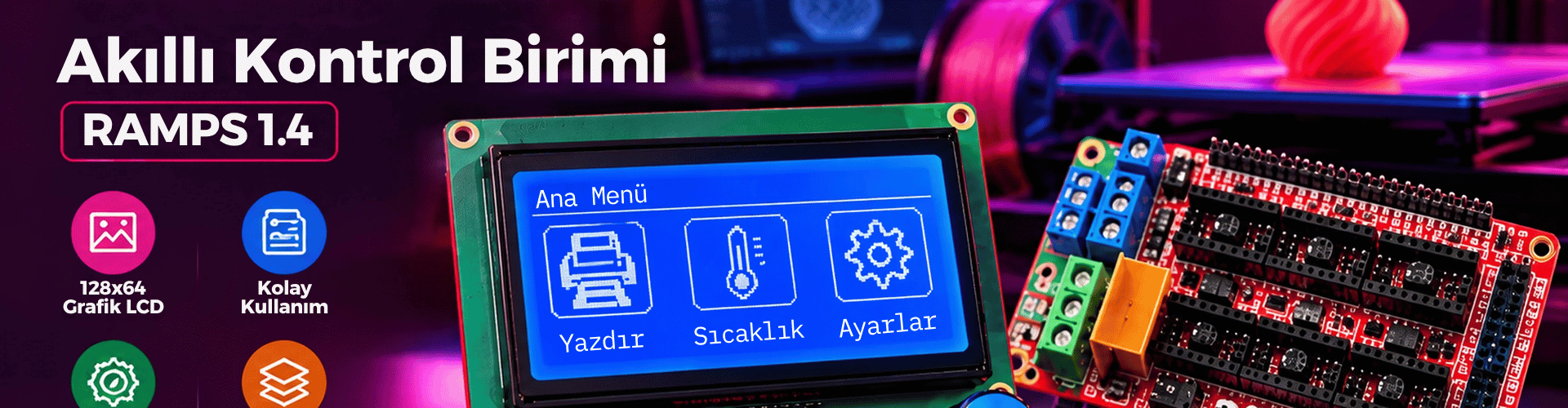
The 12864 Graphic LCD Smart Controller RAMPS 1.4 is one of the most widely used control interfaces in DIY 3D printers. Built around the Arduino Mega platform, the RAMPS 1.4 shield handles stepper motors, heaters, sensors, and displays real-time status through a 128x64 pixel graphic LCD. In this technical guide, we explain how the board works, map the relevant pins, and provide an example Arduino Mega run code to test the 12864 smart controller outside a full printer firmware environment.
What Is the 12864 Graphic LCD Smart Controller RAMPS 1.4?
The 12864 Graphic LCD Smart Controller RAMPS 1.4 is a control interface built for RepRap and similar 3D printers. RAMPS stands for RepRap Arduino Mega Pololu Shield. It plugs onto an Arduino Mega 2560 and provides a widely supported open-source hardware platform for printer firmware. The add-on smart controller includes a 128x64 pixel graphic LCD, a rotary encoder, a reset button, and an SD card slot. This panel makes the printer usable without a computer because you can navigate menus, preheat the hotend and heated bed, move axes, and start prints from the SD card. The combination of RAMPS 1.4 and the 12864 controller is common because it is inexpensive, open source, and well supported by firmware such as Marlin.
How RAMPS 1.4 and Arduino Mega Work Together
The Arduino Mega handles all high-level logic. It runs firmware that interprets G-code commands, calculates motion paths, monitors temperatures, and updates the LCD. RAMPS 1.4 acts as the shield that connects those logic signals to power electronics. Pololu-style stepper drivers plug into the shield and receive step and direction signals from the Mega. MOSFET outputs switch the hotend heater and heated bed, while thermistor inputs feed analog temperature data back to the firmware. The 12864 smart controller connects to two expansion headers, usually labeled EXP1 and EXP2. Through these headers the Mega drives the display, reads the rotary encoder, and communicates with the SD card.
Role of the 12864 Graphic LCD
The display is not only a status indicator. It gives you access to printer settings such as acceleration, jerk, temperature, and filament flow. The rotary encoder changes values, and a click acts as Enter. Because the screen runs over the same expansion headers, it does not require a separate USB connection.
Pin Mapping and Hardware Interface
A correct pin mapping is essential when you write custom firmware or test the panel outside Marlin. The following list shows the typical Arduino Mega pins used by the RepRap Discount Full Graphic Smart Controller on RAMPS 1.4.\n- LCD RS: 16\n- LCD EN: 17\n- LCD D4: 23\n- LCD D5: 25\n- LCD D6: 27\n- LCD D7: 29\n- Encoder A: 31\n- Encoder B: 33\n- Encoder button: 35\n- SD card chip select: 53\n- Buzzer: 37\nAlways treat these pins as defaults. Some RAMPS clones may route signals differently, so compare the labels on your board before connecting anything.
Connection Safety
Do not connect 12 V power directly to the 5 V logic pins. The smart controller normally receives 5 V from the RAMPS expansion headers. If the display backlight is too dim or unlit, recheck the contrast potentiometer and the EXP1/EXP2 cable orientation.
Example Arduino Mega Run Code for the 12864 LCD
The following sketch is a standalone test for the 12864 graphic LCD on RAMPS 1.4. It uses the U8glib library. Install U8glib from the Arduino Library Manager, select Arduino Mega 2560 as the board, and upload the code.
Arduino Sketch
#include \n\n// RAMPS 1.4 + 12864 full graphic smart controller pin mapping\n#define LCD_RS 16\n#define LCD_EN 17\n#define LCD_D4 23\n#define LCD_D5 25\n#define LCD_D6 27\n#define LCD_D7 29\n\n// Create the display object for the ST7920 128x64 LCD in 4-bit parallel mode\nU8GLIB_ST7920_128X64_4X u8g(LCD_RS, LCD_EN, LCD_D4, LCD_D5, LCD_D6, LCD_D7);\n\nvoid drawScreen(void) {\n u8g.setFont(u8g_font_6x10);\n u8g.setPrintPos(0, 10);\n u8g.print("RAMPS 1.4");\n u8g.setPrintPos(0, 25);\n u8g.print("Arduino Mega");\n u8g.setPrintPos(0, 40);\n u8g.print("12864 LCD");\n u8g.setPrintPos(0, 55);\n u8g.print("Smart Controller");\n}\n\nvoid setup() {\n u8g.begin();\n}\n\nvoid loop() {\n // U8glib redraws the page in a loop to avoid flicker\n u8g.firstPage();\n do {\n drawScreen();\n } while (u8g.nextPage());\n delay(100);\n}Code Explanation
The sketch first includes U8glib and defines the LCD control pins. The constructor U8GLIB_ST7920_128X64_4X creates a 4-bit parallel display object that matches the RAMPS smart controller interface. In drawScreen, the code sets a monospace font and draws four lines on the 128x64 pixel screen. The loop uses firstPage and nextPage to redraw the graphic buffer cleanly. If the text is not visible, check the contrast adjustment on the back of the display. This test confirms that your Arduino Mega, RAMPS board, and 12864 controller are wired correctly. From here you can extend the sketch to read the rotary encoder and build a simple menu.
Using the Panel in Marlin
If your goal is to run a 3D printer, you normally do not write the LCD driver from scratch. Instead, enable the smart controller in Marlin firmware. In Configuration.h, uncomment or add the following line:\n#define REPRAP_DISCOUNT_FULL_GRAPHIC_SMART_CONTROLLER\nAfter this change, compile Marlin for Arduino Mega 2560 with RAMPS 1.4 as the board type. Firmware then takes care of LCD refresh, encoder input, and SD card menus.
Common Applications and Use Cases
The 12864 Graphic LCD Smart Controller RAMPS 1.4 is most common in DIY 3D printers built from open-source designs such as Prusa i3, Mendel, and custom CoreXY machines. It is also used in small CNC routers, laser engravers, and pick-and-place machines because RAMPS can control multiple stepper axes and auxiliary devices. The full graphic smart controller is especially useful in standalone operation. You can preheat, home axes, select an SD file, and start a print without a computer. This makes it a practical control unit for workshops, education, and small production environments.
The 12864 Graphic LCD Smart Controller RAMPS 1.4 remains a practical starting point for DIY motion-control projects. By understanding how the Arduino Mega, RAMPS shield, and 12864 display exchange signals, you can troubleshoot hardware and write custom interface code with confidence. The example Arduino Mega sketch in this guide gives you a clean starting point for displaying data on the graphic LCD and verifying the EXP1/EXP2 connection.
Upload the example sketch to your Arduino Mega and confirm that the 12864 smart controller displays the test text. Then extend it with rotary encoder input or enable the panel in Marlin firmware for full 3D printer control.